

Introduction
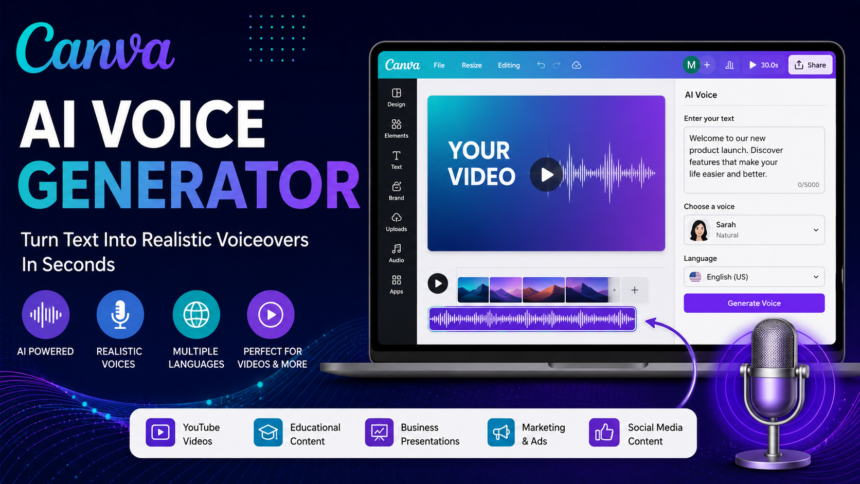
The Canva AI Voice Generator is an AI-powered text-to-speech tool that helps users create realistic voiceovers directly inside Canva. Instead of recording audio manually, you can simply type your script, choose a voice, and generate narration within seconds. This makes it easy to produce professional videos, presentations, social media content, tutorials, and marketing materials without additional recording software or expensive equipment.
As AI-powered content creation continues to grow in 2026, Canva has expanded its creative tools to include faster and more natural voice generation. Whether you’re a content creator, educator, business owner, or marketer, the Canva AI Voice Generator can save time while improving the quality of your projects. In this guide, you’ll learn how it works, its key features, pricing, best use cases, advantages and disadvantages, and how it compares with other popular AI voice generators.
Fast Info Table
| Feature | Details |
|---|---|
| Tool Name | Canva AI Voice Generator |
| Category | AI Voice Generator |
| Best For | Content creators, teachers, marketers, businesses |
| Platform | Web and Mobile |
| AI Feature | Text-to-Speech Voice Generation |
| Languages | Multiple languages supported |
| Voice Styles | Various natural AI voices |
| Free Plan | Yes (limited features) |
| Premium | Canva Pro |
| Export Formats | MP4, presentations, videos |
What Is Canva AI Voice Generator?
Canva AI Voice Generator is an AI-powered text-to-speech feature built into Canva that converts written text into natural-sounding voiceovers. Instead of recording your own voice, you simply type your script, choose an AI voice, adjust the language or accent, and generate narration within seconds.
This feature is especially useful for creating videos, presentations, educational lessons, social media content, YouTube explainers, product demonstrations, and business marketing materials. Since the voice generation happens inside Canva, users do not need separate voice editing software.

The biggest advantage is convenience. Users can design graphics, edit videos, add animations, and generate professional voiceovers all from one platform. This saves time and simplifies content creation for beginners and professionals alike.
The AI voices continue to improve with more natural pronunciation, better pacing, and multiple language options, making them suitable for a wide variety of audiences.
Key Features
The Canva AI Voice Generator offers several useful features that help users produce high-quality narration without expensive recording equipment.
Natural AI Voices
The platform provides voices designed to sound clear and realistic. Different speaking styles make it easier to match educational, promotional, or storytelling content.
Multiple Languages
Users can create voiceovers in numerous languages and regional accents, helping businesses and creators reach international audiences.
Text-to-Speech Conversion
Simply paste your script into Canva, choose a voice, and the AI converts text into spoken audio automatically.
Built-In Video Editor
Unlike standalone AI voice tools, Canva lets users immediately add voiceovers to videos, presentations, and animations without exporting files between applications.
Easy Timeline Editing
Voice clips can be trimmed, repositioned, synchronized with animations, and adjusted directly inside the Canva editor.
Beginner-Friendly Interface
No audio editing experience is required. The controls are simple enough for students, teachers, marketers, and business owners.
Cloud-Based Platform
Projects remain available online, allowing users to continue editing from different devices.
Collaboration Features
Teams can work together on presentations, videos, and marketing materials while sharing voiceover projects in real time.
How to Use Canva AI Voice Generator
Creating AI voiceovers inside Canva is a straightforward process.
Step 1: Open Canva
Sign in to your Canva account and create a new video, presentation, or design project.
Step 2: Add Your Script
Write or paste the text you want the AI narrator to read.
Step 3: Access AI Voice Tools
Locate the text-to-speech or AI voice feature available within Canva’s editing tools.
Step 4: Choose a Voice
Select the preferred language, accent, and voice style that best fits your content.
Step 5: Generate the Voice
Click the generate option and allow Canva to convert your text into speech.
Step 6: Review the Audio
Listen carefully to the narration. If needed, edit the script or choose another voice.
Step 7: Synchronize with Content
Place the voiceover on the video timeline and adjust its timing alongside animations, transitions, and visuals.
Step 8: Export Your Project
Download your finished presentation or video once you’re satisfied with the results.
Best Use Cases
The Canva AI Voice Generator is suitable for many industries and content types.
YouTube Videos
Creators can produce introductions, tutorials, reviews, and educational videos without recording their own voices.
Social Media Content
AI narration improves engagement on TikTok, Instagram Reels, Facebook videos, LinkedIn content, and short-form videos.
Business Presentations
Companies can create professional presentations with consistent voice narration for meetings and training.
Educational Lessons
Teachers can prepare interactive learning materials, online classes, and student tutorials using AI-generated speech.
Product Demonstrations
Businesses often use AI voiceovers to explain product features in promotional videos.
Online Courses
Course creators can quickly produce narrated lessons while maintaining consistent audio quality.
Marketing Campaigns
Digital marketers use AI-generated narration for advertisements, promotional videos, and brand awareness campaigns.
Internal Training
Organizations can create employee onboarding materials and instructional videos more efficiently.
Pricing and Plans
Canva provides different subscription options depending on user needs.
Free Plan
The free version allows users to access many design tools with limited AI functionality. Some AI voice features may have usage restrictions.
Canva Pro
The Pro plan includes additional premium templates, advanced editing tools, more AI capabilities, expanded storage, and greater creative flexibility.
Canva Teams
Designed for businesses and organizations, this plan includes collaboration features, brand management tools, shared assets, and centralized project control.
Enterprise Solutions
Large organizations can benefit from advanced administration, security controls, and workflow management.
Pricing may change over time, so users should always review Canva’s official pricing page before subscribing.
Pros and Cons
Like any AI tool, the Canva AI Voice Generator has strengths and limitations.
Pros
- Easy for beginners
- Built directly into Canva
- No recording equipment required
- Supports multiple languages
- Fast text-to-speech generation
- Saves editing time
- Works well for presentations and videos
- Cloud-based collaboration
- Suitable for businesses and educators
- Professional workflow integration
Cons
- Premium features require Canva Pro
- Voice customization is more limited than dedicated AI voice platforms
- Some voices may still sound slightly artificial
- Advanced emotional expression is limited
- Usage limits may apply depending on the subscription
Canva AI Voice Generator vs Alternatives
Several AI voice generators compete with Canva, each offering different strengths.
| Tool | Best For | Strengths | Limitations |
|---|---|---|---|
| Canva AI Voice Generator | Designers | Built into Canva workflow | Fewer advanced voice controls |
| ElevenLabs | Professional narration | Extremely realistic voices | Higher pricing |
| Murf AI | Business presentations | Excellent voice quality | Premium plans required |
| Speechify | Reading documents | Natural speech | Limited design features |
| PlayHT | Podcasts | Large voice library | Learning curve |
| LOVO AI | Marketing | Emotional voice options | Some premium restrictions |
If your primary workflow already involves Canva, its AI voice generator offers excellent convenience. However, creators focused on audiobook narration, podcasts, or highly expressive voice acting may benefit from specialized AI voice platforms.
Frequently Asked Questions
Is Canva AI Voice Generator free?
Canva offers a free plan, but some AI voice capabilities and premium voices may require a Canva Pro subscription.
Can I use Canva AI Voice Generator for YouTube?
Yes. Many creators use it for YouTube tutorials, educational videos, explainers, and product demonstrations, provided they comply with Canva’s licensing terms.
Does Canva support multiple languages?
Yes. Canva supports multiple languages and accents, although availability may vary depending on the selected AI voice.
Can I edit the generated voice?
You can edit your script, regenerate the narration, and adjust timing within the Canva timeline.
Is Canva AI Voice Generator good for business videos?
Yes. It is suitable for presentations, employee training, marketing videos, sales content, and educational materials.
Which is better: Canva or ElevenLabs?
Canva is ideal for integrated design and video creation, while ElevenLabs generally provides more advanced voice realism and customization.
Conclusion
The Canva AI Voice Generator is an excellent solution for creators who want to produce professional voiceovers without purchasing expensive recording equipment or learning complex audio software. Because it integrates directly into Canva’s design environment, users can create presentations, videos, social media posts, educational content, and marketing materials from one platform.
Its ease of use, multilingual support, cloud collaboration, and built-in editing tools make it particularly attractive for beginners, teachers, marketers, and small businesses. While dedicated AI voice platforms may offer deeper voice customization, Canva delivers an efficient all-in-one workflow that saves time and simplifies content creation.
If you already use Canva for designing graphics or videos, the Canva AI Voice Generator is a practical feature that can significantly improve your productivity while helping you create polished, engaging content.