


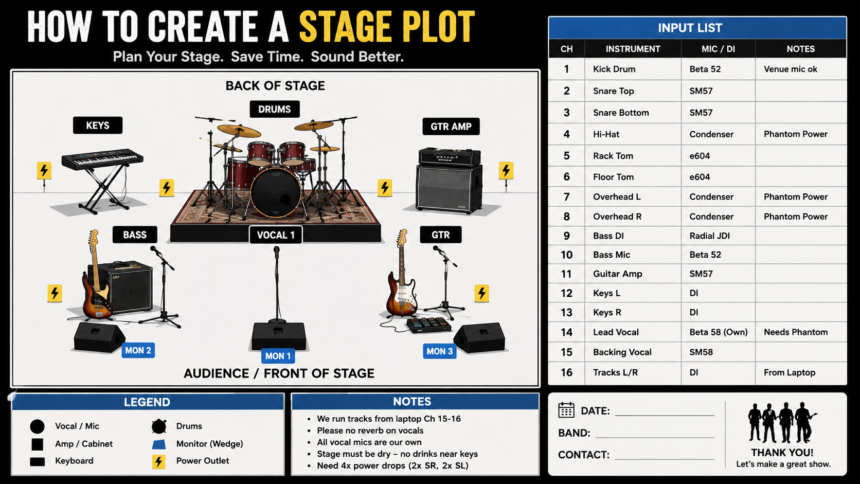
If you’ve ever shown up to a gig and watched the crew spend 20 minutes figuring out where the drums go, you know why a *stage plot* matters.
A *stage plot* is a simple diagram of your band or performance setup. It shows where every person, instrument, amp, mic, and monitor sits on stage. Pair it with an input list and suddenly sound engineers, venue staff, and lighting techs all know what you need before you even unload the van.
Done right, it saves time, reduces stress, and makes your show sound better. Here’s exactly how to create one.
What Is a Stage Plot and Why Do Venues Ask For It?
Think of it as the blueprint for your live show.

*The stage plot covers:*
– *Layout*: Where each band member stands
– *Gear*: Drums, keys, amps, DJ booth, risers
– *Power*: Where you need outlets
– *Monitors*: Who needs a wedge or IEM mix
*The input list covers:*
– Channel number, instrument, mic type, and any special notes like “phantom power” or “DI needed”
Venues ask for it in advance because they’re loading multiple bands in one night. With your *stage plot* in their inbox, they can pre-label channels, place mics, and set monitor mixes. Without it, they’re guessing, and guessing on show day leads to feedback, missing gear, and a late start.
What You Need Before You Start
Grab 3 things first so you don’t have to redo it later:
1. *A roster of your lineup*: Who’s playing and what they play. Include subs.
2. *A gear list*: Every instrument, amp, pedalboard, laptop, and special item. Note if you bring your own mics/stands.
3. *Stage dimensions*: If you know the venue size, great. If not, design for a standard 20ft x 12ft stage and note “adaptable.”
Pro tip: Talk to your band. The guitarist who “sometimes” brings a second amp needs to decide now.
Step-by-Step: How to Create a Stage Plot
You don’t need CAD software. Clarity beats fancy graphics every time.
*Step 1: Choose your orientation*
Draw the stage from the audience’s point of view. Top of the page = back of stage. Bottom of the page = front of stage/audience. Put “AUDIENCE” at the bottom so there’s no confusion.
*Step 2: Place your people first*
Start with where humans stand. Drummer usually center-back. Vocalists front and center. Guitarists stage left/right. Keys wherever they fit. Use simple shapes and label them: `VOCAL 1`, `GTR`, `BASS`, `DRUMS`.
*Step 3: Add gear around each person*
Put the amp behind the guitarist, the keyboard in front of the keys player, the drum kit outline behind the drummer. Show risers if you use them. Mark “own rug” or “own drum riser” so the crew knows.
*Step 4: Mark monitors and power*
Draw a small wedge in front of each person who needs one. Label `MON 1`, `MON 2`. If you use in-ears, write `IEM`. Add lightning bolt symbols where you need power drops. Group them: “2x power stage L, 1x power stage R.”
*Step 5: Number your inputs*
This is the part techs love. Create a table next to your diagram.
**Ch** **Instrument** **Mic/DI** **Notes**
1 Kick Drum Beta 52 Venue mic ok
2 Snare Top SM57
3 Lead Vocal Own Beta 58 Needs phantom
4 Guitar Amp SM57
5 Bass DI Radial JDI
Match the channel numbers to your *stage plot* so the engineer can see “Ch 4 is by the guitarist on stage right.”
*Step 6: Add a legend and notes*
Not everyone knows your symbols. Include a small key: circle = vocal, square = amp, triangle = monitor. Then add 3-4 bullet notes:
– “We run tracks from laptop Ch 15-16”
– “Please no reverb on vocals”
– “Stage must be dry — no drinks near keys”
Tools You Can Use
You have options depending on how polished you want it:
– *Quick and free*: Google Slides, PowerPoint, or even Paint. Use shapes and text boxes. Export as PDF.
– *Band-focused*: Stage Plot Pro, BandHelper, or SoundTrax. They have drag-and-drop instruments.
– *Pro look*: Illustrator or Canva templates. Good if you tour a lot and send this to festivals.
The format venues prefer is PDF, one page. Name the file: `BandName_StagePlot_InputList_2026.pdf`
5 Common Mistakes to Avoid
1. *Making it too detailed*: Don’t draw every cable. The goal is layout, not an engineering schematic.
2. *Forgetting the input list*: A diagram without channels is only half useful.
3. *Not updating it*: New singer? New synth? Update the *stage plot* before you send it to the next venue.
4. *Using only “my left”*: Always use stage left and stage right from the audience perspective.
5. *Sending it late*: Send it with your tech rider at least 2 weeks before the show, and bring printed copies on the day.
A Quick Template You Can Copy
[BACK OF STAGE]
[DRUMS]
[KEYS] [GTR AMP]
[MON3] [MON1] [MON2]
[VOCAL] [BASS] [GTR]
[AUDIENCE]
[FRONT OF STAGE]
NOTES: 4x vocal mics, 2x guitar DIs, Tracks L/R on Ch15-16
Pair that with your input list and you’re 90% there.
Conclusion
A good *stage plot* isn’t about looking impressive. It’s about communication. When the sound crew can glance at one page and know where everyone stands, what they play, and what they need to hear, your soundcheck gets shorter and your show gets tighter.
Start simple: people, gear, monitors, power, and a clear input list. Use labels everyone understands, keep it to one page, and send it early. The first time a venue thanks you for sending it ahead of time, you’ll see why every touring band treats the *stage plot* as essential as their setlist.
Want me to turn your band’s lineup into a clean one-page *stage plot* template you can edit? Tell me who’s in the band and what gear you use, and I’ll draft it for you